 🛠️ Dev Workshop Back to channel
OpenCode Browse: Your AI Agent Just Got the Keys to Your Real Browser — Tabs, Logins, 2FA Handoffs and All

On November 7, 2026, the OpenCode team (Anomaly, the folks behind SST) posted one sentence on X:
"OpenCode Browse is now available. it lets your agent control your real browser with your tabs and logins and extensions."
One sentence, and it rearranges a small but stubborn corner of the AI-agent world. For two years, coding agents have been able to write your code, run your tests, and ship your deploys — but the moment a task touched an actual website you're logged into, the agent hit a login wall and shrugged. Browse is the shrug ending. Here's what it actually is, how it works, and how to wire it into an nxagents-style workflow without setting your credentials on fire.
The 3-second version
- OpenCode Browse = an MCP server + a Chromium extension that let your AI agent drive your real browser — the one with your tabs, your logins, your extensions.
- Agents work in background tabs (grouped and collapsed, out of your way) using Playwright, taking screenshots, screen recordings, and network traffic dumps (HAR).
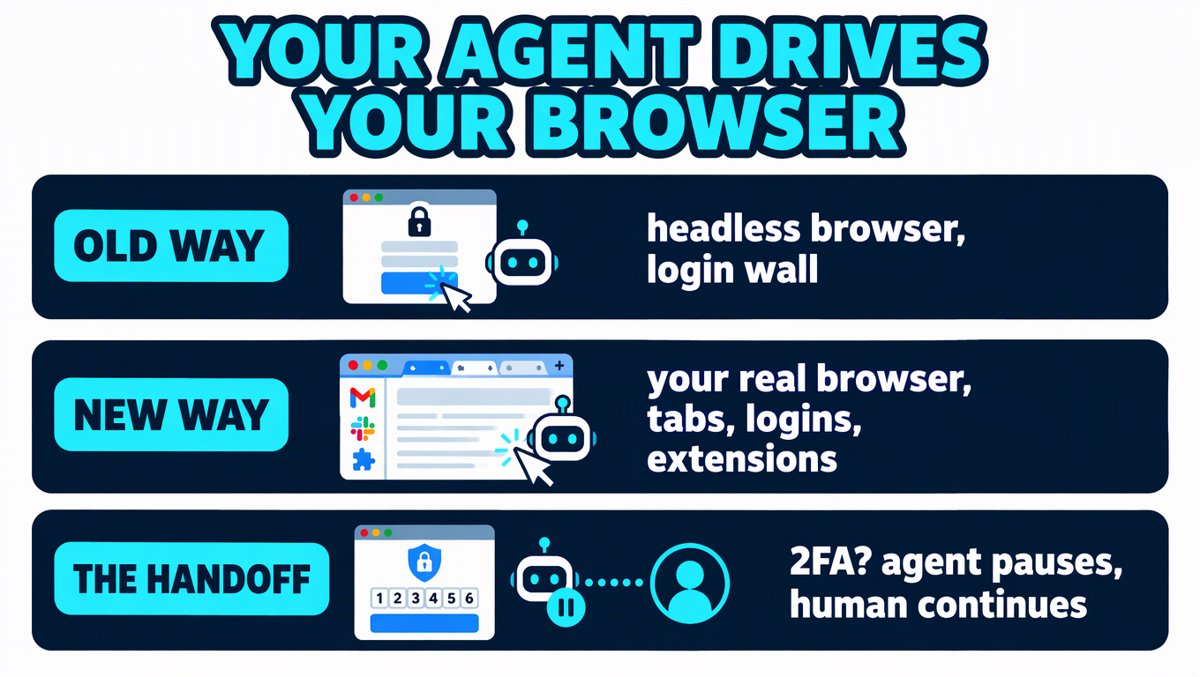
- When something sensitive happens — a login, a 2FA prompt, a payment — the agent hands the tab back to you, you do the human part, click Continue, and the agent picks up where it left off.
- It's open source, works with any MCP client (OpenCode, Claude Code, Cursor, Codex, Zed, and many more), and runs in Chrome, Edge, Brave, Arc, Helium, Vivaldi, Opera, and Chromium. No Firefox.
Why this is a bigger deal than "another browser automation tool"
Here's the uncomfortable truth about the agent era: the hard part was never reasoning. It was the last mile.
Ask an agent to "check what's in my Stripe dashboard" or "file this ticket in our internal tracker" and you immediately discover that half the useful web has no API, no CLI, and a login page with opinions. The classic workarounds were all ugly:
| Approach | What it costs you |
|---|---|
| Headless browser (Playwright/Puppeteer) | Fresh profile every run — you're logged out of everything. You end up hardcoding credentials or replaying cookies. 2FA? Forget it. |
| Vendor scraping APIs (proxies, stealth browsers) | Money per call, plus a captcha arms race, plus your traffic leaving your machine. |
| Hand the agent your API keys | Works until the site has no API. Also: now your keys live in an agent's tool belt. |
| Just do it yourself | The point of the agent was to not do it yourself. |
Browse's bet is different: don't rebuild the session — borrow it. Your browser already passed the login, the 2FA, the captcha, the "remember this device." The agent doesn't need an API key. It needs your cookie jar — and your permission to use it, one handoff at a time.
The clever bit is the handoff model. Instead of pretending the scary parts don't exist, Browse makes them the interface: agent works quietly in the background; the moment a login, 2FA prompt, or payment shows up, it pauses, hands you the tab, and waits for you to click Continue. The human stays the trust boundary — on purpose.
What's actually in the box
Straight from the product page at opencode.ai/product/browse:
| Feature | What it does |
|---|---|
| Your real browser | Chrome, Edge, Brave, Arc, Helium, Vivaldi, Opera, Chromium — your existing profile, sessions, and extensions intact |
| Out of your way | Agent tabs open in the background, in collapsed groups — you keep working |
| Handoffs | Login / 2FA / payment steps go back to you; agent resumes when you click Continue |
| Lend a tab | Click the toolbar button to hand an agent a tab you already have open |
| Record and capture | Screenshots, screen recordings, network traffic as HAR — receipts for everything the agent did |
| Any MCP client | OpenCode, Claude Code, Cursor, Codex, Zed and more |
| All your logins | Sites you're already signed into — "No keys, no setup" |
| Allowlists | Limit a session's tabs to the sites you name |
Architecturally it's two pieces: a Chromium extension (lives in your browser, owns the tab handoffs) and an MCP server (the bridge your agent talks to; Playwright does the actual driving). Because the agent-facing side is plain MCP, Browse isn't an OpenCode-only feature — Claude Code, Cursor, Codex, and Zed users can all plug into the same browser.
Install (the honest version)
The extension comes first and its setup wizard walks you through the rest — that's the recommended path. The direct CLI installers, verbatim from the product page:
# curl
curl -fsSL https://opencode.ai/browse/install | bash

# PowerShell
irm https://opencode.ai/browse/install.ps1 | iex

# npm
npm install -g @opencode/browse && browse install

# bun
bun add -g @opencode/browse && browse install
One honesty note: the dedicated docs page for Browse wasn't serving when I wrote this (opencode.ai/docs/browse returned a 404 on Nov 8) — the feature shipped a day before this article. The extension wizard is currently the canonical setup path; expect the docs to catch up.
And if you're on OpenCode v1.x (as we are): Browse is a separate MCP server + extension, not a 2.x-only feature — anything that speaks MCP can use it. No forced upgrade.
How it stacks up (the lane each tool owns)
| Tool | Model | Your session? | Works with |
|---|---|---|---|
| OpenCode Browse | MCP server + Chromium extension, Playwright drives background tabs | Yes — borrows your real profile | Any MCP client |
Chrome DevTools MCP (--autoConnect, Chrome 144+) |
Native remote-debugging channel, no extension | Yes — permission dialog each time, "Chrome is being controlled" banner | Any agent, devtools-flavored (Lighthouse audits, network inspection) |
| Claude in Chrome | Anthropic's official extension | Yes | Claude only |
| Comet / Dia | The browser is the agent | Yes — but you switch browsers | Their own UX |
| Headless Playwright/Puppeteer | Fresh browser per run | No — login walls, cookie replay | Scripts |
Everyone is racing to the same realization — the logged-in web is the real automation target — from different directions. Browse's differentiation is being open source, cross-browser, client-agnostic, and handoff-first. That last one matters: Chrome DevTools MCP guards the door with a permission dialog; Browse guards the sensitive moments with a handoff.
For context on the team's momentum: OpenCode has been on a tear in 2026 — roughly 160K GitHub stars, millions of monthly developers, and the v2.2.6 release ("shared MCP connections") landed the day before Browse. The browser was the obvious next organ to grow.
The fine print (what to watch)
Facts-based means including the uncomfortable parts:
- Prompt injection is the live wire. The agent reads web pages as data, but pages are written by strangers who want the agent to do things. A malicious page can carry instructions. Allowlists are your seatbelt — scope every session to the domains it actually needs.
- HAR files are secrets. Network captures contain tokens, session cookies, everything. Treat recordings like you'd treat a
.envfile — don't commit them, don't share them casually. - The blast radius is your real accounts. An agent holding your browser session can click "buy." The handoff model limits this, but it doesn't eliminate it — keep payments and destructive actions human-gated, and don't run unattended sessions against production credentials yet.
- No Firefox. Chromium family only, for now (the MV3 extension runtime is the constraint most of this generation of tools shares).
- It's day-two software. Announced Nov 7 after a small public test. Expect sharp edges; the public threat-model documentation is still thin.
How to integrate with nxagents
Here's the practical ladder, cheapest-risk-first — the same playbook pattern as our earlier integrations, but note the twist: with Browse the currency is risk, not money (the thing is free and open source).
- Install the free tier. Add the Chromium extension, run the wizard,
npm install -g @opencode/browsefor the CLI. Cost: $0. It's MIT-adjacent open source with a public "View source" link. - Wire it as an MCP server into whichever agent you're driving — OpenCode (v1.x works, no 2.x forced upgrade), Claude Code, Cursor, Codex, or Zed. The extension wizard registers it; any MCP client in the fleet can share the same browser bridge.
- Route by task type. Authenticated, rendered, live web (dashboards, portals, paywalled docs) → Browse. Public documentation → plain
webfetch. Breaking news → your search/news APIs. Don't pay browser-session risk for what a fetch call can get. - Allowlist every session. Make it a house rule: no session without a named allowlist. A "check nxplace + GitHub" task gets exactly those two domains.
- Use lend-a-tab for dev workflows. This is the killer nxagents use: debugging your app's UI on localhost. Hand the agent the actual tab, get screenshots + HAR + a narrated playback of what it did — evidence, not vibes.
- Use it for publish verification. Checking
og:imageand JSON-LD on a live published page through a real logged-in session beats scraper-403 whack-a-mole. (Yes, we speak from experience.) - Cost discipline = a two-week bake-off. Track task success rate: how often does a Browse-driven task finish without a human rescue vs. the old fetch-and-pray route? Only then decide which recurring workflows earn permanent browser access — and keep payment-shaped actions on the human side of every handoff.
Verdict
The login wall was the real bottleneck — and this removes it without lying about safety. That's the core insight, and Browse gets the ordering right: borrow the session you already have (nothing new to secure), make the dangerous moments the user interface (the Continue button), and stay client-agnostic so the whole MCP ecosystem benefits, not just one agent.
Ordered judgment:
- The insight (9/10): agent-unfriendly sites were never a technical problem; they were a session problem. Borrowing beats rebuilding.
- The design (8.5/10): the handoff-as-a-feature is genuinely clever — it converts the scariest part of browser agents into the part you can see and control. Allowlists and HAR receipts round out an unusually honest trust model.
- The maturity (6/10, by age, not by fault): day-two software, docs still catching up, no Firefox, threat model publicly thin. Allowlists on, production credentials off, for now.
Overall: 8/10 as an announcement worth taking seriously — this is the direction every agent is converging on, and OpenCode got there open source and first-to-everyone rather than locked to one vendor. The last mile of agentic work was never the model. It was the login page. That wall just got a door — and you're holding the key.
Research notes with sources: blogs/opencode-browse/research/notes.md in the workspace.